 Paysum
Dynamic delivery
Deliver each order from your own server: Paysum asks your endpoint what to deliver.
With dynamic delivery, Paysum calls your server when an order for a product is paid. Your server returns what the buyer gets, for example a key it just generated. Paysum stores the answer on the order and delivers it like a license key.
Turn it on
- Open the product under Products → Products.
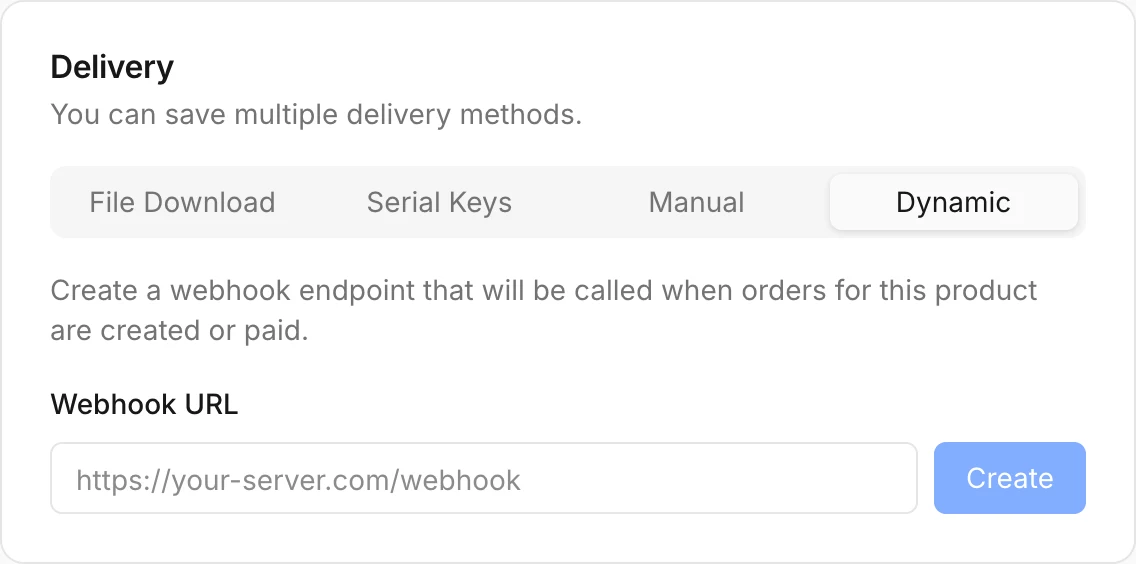
- In Delivery, click Dynamic.
- Enter your Webhook URL and click Create.
- Save the product.
The request
Paysum sends a POST with a JSON body:
POST /paysum/deliver HTTP/1.1
Content-Type: application/json
User-Agent: Paysum-Delivery/1.0
Idempotency-Key: 8c1f6a52-0d0e-4a3f-9a57-1b7e6f2c9d10
x-webhook-signature: t=1767225600,v1=5f2b…
{
"event": "delivery.requested",
"test": false,
"delivery_id": "8c1f6a52-0d0e-4a3f-9a57-1b7e6f2c9d10",
"order_id": "ord_…",
"store_id": "00000000-0000-4000-8000-000000000001",
"product": { "id": "prod_…", "name": "Lifetime License" },
"variant": { "id": "var_…", "name": "Lifetime" },
"quantity": 1,
"customer": { "email": "[email protected]", "discord_id": null },
"created_at": "2026-11-21T09:00:00.000Z"
}| Field | Notes |
|---|---|
test | true for test requests. Do not hand out real stock for them. |
delivery_id | Unique per delivery (the order line's ID). Also sent as Idempotency-Key. Test requests use a test_ prefix. |
variant | null when the product has no variant. |
quantity | How many items the buyer bought. |
customer.discord_id | Set when the buyer linked Discord at checkout. |
Verify the signature
The x-webhook-signature header is signed with your store's webhook signing secret, the same secret as other Paysum webhooks. Find it under Integrations → API keys → Webhook signing secret.
The header has the form t=<unix seconds>,v1=<hex>. v1 is the hex HMAC-SHA256 of <t>.<raw body>. Accept the request if any v1 matches, and reject old timestamps. See Verifying signatures for code.
The response
Answer 2xx with the items to deliver. Paysum accepts any of these:
| Response | Delivers |
|---|---|
{ "items": ["KEY-1", "KEY-2"] } | Each string as one item |
{ "item": "KEY-1" } | One item |
{ "content": "Your login: …" } | One item |
["KEY-1", "KEY-2"] | Each string as one item |
| Plain text | The whole body as one item |
Return one item per unit when quantity is more than 1.
Limits and errors
| Limit | Value |
|---|---|
| Timeout | 15 seconds |
| Response size | 64 KB |
| Items per delivery | 100 |
| Characters per item | 4,000 |
| Redirects | Not followed |
A non-2xx answer, invalid JSON, an empty body or an empty item fails the delivery. The order shows Delivery failed with the reason.
Retries and idempotency
If your server fails, Paysum asks again the next time the delivery is requested, for example when the buyer opens the order page. Every attempt for the same delivery sends the same Idempotency-Key. Store the items you created for a delivery_id and return the same items on a retry, so a buyer never gets two keys for one purchase. Once Paysum saves your answer, it does not call your server again for that delivery.
Example
import crypto from 'node:crypto'
import express from 'express'

const app = express()
const secret = process.env.PAYSUM_WEBHOOK_SECRET
const issued = new Map() // use your database in production

app.post('/paysum/deliver', express.raw({ type: 'application/json' }), (req, res) => {
  const parts = (req.get('x-webhook-signature') || '').split(',').map((p) => p.split('='))
  const t = parts.find(([k]) => k === 't')?.[1]
  const expected = Buffer.from(
    crypto.createHmac('sha256', secret).update(`${t}.${req.body}`).digest('hex'),
  )
  const valid = parts.some(
    ([k, v]) => k === 'v1' && v.length === expected.length && crypto.timingSafeEqual(Buffer.from(v), expected),
  )
  if (!valid || Math.abs(Date.now() / 1000 - Number(t)) > 300) return res.status(401).end()

  const event = JSON.parse(req.body)
  if (!issued.has(event.delivery_id)) {
    const keys = Array.from({ length: event.quantity }, () => crypto.randomUUID().toUpperCase())
    issued.set(event.delivery_id, keys)
  }
  res.json({ items: issued.get(event.delivery_id) })
})

app.listen(3000)